The content of this page has been automatically translated by AI. If you encounter any problems while reading, you can view the corresponding content in Chinese.
This article guides you on how to recover your Tencent Cloud account log in to password in case you forget it.
Notes
If you signed up for your Tencent Cloud account with an email address, or if you used a non-email registration method but have bound your account to an email address (i.e., you can log in using the email address), you can follow the instructions below to recover your password.
If you forgot your account, you can go to Find Account and recover your account using the account ID, mobile number, domain name, and record information
If you forgot your QQ, WeChat, and WeChat official accounts passwords, you can go to the respective platforms to reset your password.
Prerequisites
You signed up for your Tencent Cloud account with an email address or had bound your account to an email when using a non-email registration method.
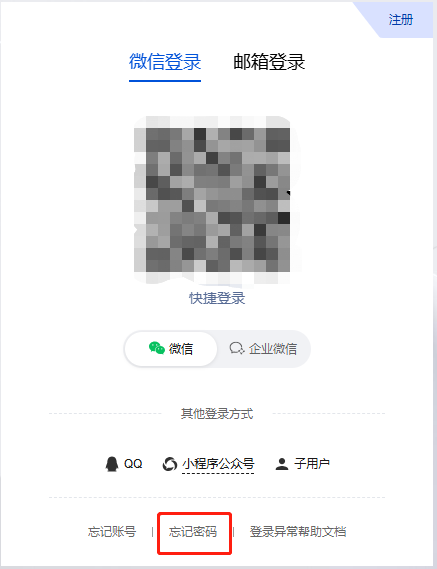
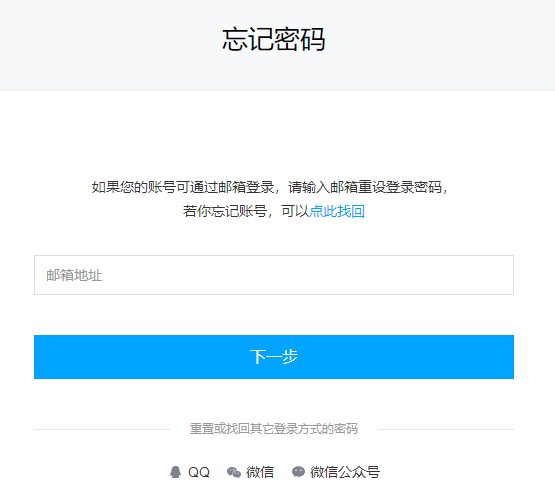
4. On the Forgot password page, enter your email address, click Next .
5. click Go to Email.
6. Log in to your email and open the password reset email sent by Tencent Cloud.
7. Click Password Reset or copy the link to your browser to open the Set New Password page.
8. On the set new password page, enter the new password , click Next .
9. In the pop-up identity verification window, follow the prompts to complete the verification.
After successful verification, returning to the following page indicates a successful change.